Choosing Construction Project Management Software NZ Builders Trust
Choosing the right construction project management software in NZ isn't a luxury anymore - it's essential for navigating tight timelines, unpredictable material costs, and razor-thin profit margins. For Kiwi builders, the best tools bring job scheduling, subbie communication, and on-site data capture into one place, creating a single source of truth from tender to final invoice.
Why Kiwi Builders Are Swapping Spreadsheets for Software
The New Zealand construction sector is up against a perfect storm. We're dealing with persistent labour shortages, volatile supply chains, and a mountain of compliance paperwork that seems to grow every year. For many small to medium-sized trade businesses, the old ways of running jobs with spreadsheets, whiteboards, and overflowing folders just aren't cutting it anymore.
This pressure is forcing a move to digital, where finding efficiencies isn't just a nice-to-have, but a matter of survival. It’s about taking back control. In a market where every dollar and every hour counts, construction project management software in NZ has become the go-to tool for Kiwi builders to fight back against the chaos. It provides the structure needed to manage complex jobs, slash costly admin time, and get a real-time pulse on project health.
Getting on Top of Industry Pressures
The industry’s pain points are no secret. Skilled labour is scarce, which makes getting the most out of your existing crew absolutely critical. At the same time, material costs can jump without warning, making sharp quoting and budget tracking more important than ever. This is exactly where digital tools step in.
- Smarter Scheduling: Centralised calendars let you see crew availability at a glance, assign tasks, and instantly ping subbies about changes. No more costly downtime.
- Real-Time Cost Tracking: By linking purchasing and invoicing, the software gives you a live look at project expenses versus the budget, helping protect your margins.
- Clearer Communication: A single platform for all project chat - from RFIs to daily logs - ensures everyone is working off the same plans, cutting down on rework and miscommunication.
The chart below, showing recent building consent trends, underscores just how much work is flowing through the system. This sustained demand in both residential and commercial sectors makes it clear that having robust systems is non-negotiable for handling a consistent pipeline of complex projects.
"For Kiwi builders, the biggest win from project management software is clarity. It replaces guesswork with data, giving you the confidence to make better decisions about labour, materials, and timelines."
A Smart Response to a Tough Market
Adopting these tools is a strategic move. In New Zealand's construction sector, the uptake of project management software has soared, driven by the need to tackle chronic labour shortages and spiralling material costs. A comprehensive annual study by BDO New Zealand, which surveyed over 200 business leaders, found that 68% of Kiwi construction firms cited digital tools as their top strategy for improving efficiency. This comes as the industry faces a 15% labour shortfall compared to pre-COVID levels.
Ultimately, this software helps Kiwi builders deliver projects on time and on budget, which builds a solid reputation and sets them up for long-term growth. A big part of this is automating the repetitive stuff. Check out our guide on how automation helps tradies manage quotes and jobs to see how you can reclaim valuable time.
Key Software Features for NZ Construction Businesses
When you’re looking to choose the right construction project management software in NZ, it’s easy to get lost in flashy sales pitches. The real goal is to find features that solve the everyday problems Kiwi builders actually face. A platform built for a huge American commercial contractor is often just clunky and impractical for a residential building company in Christchurch. The trick is to pinpoint the tools that match the on-the-ground reality of working in New Zealand.
These core features aren't just about making life easier; they're about giving you better control, boosting efficiency, and protecting your profit margins on every single job. Whether you're coordinating subbies on a remote site or quoting with constantly changing material costs, the right software becomes the central nervous system for your whole operation. It helps you get ahead of problems instead of constantly putting out fires.
Job Scheduling for the Kiwi Climate
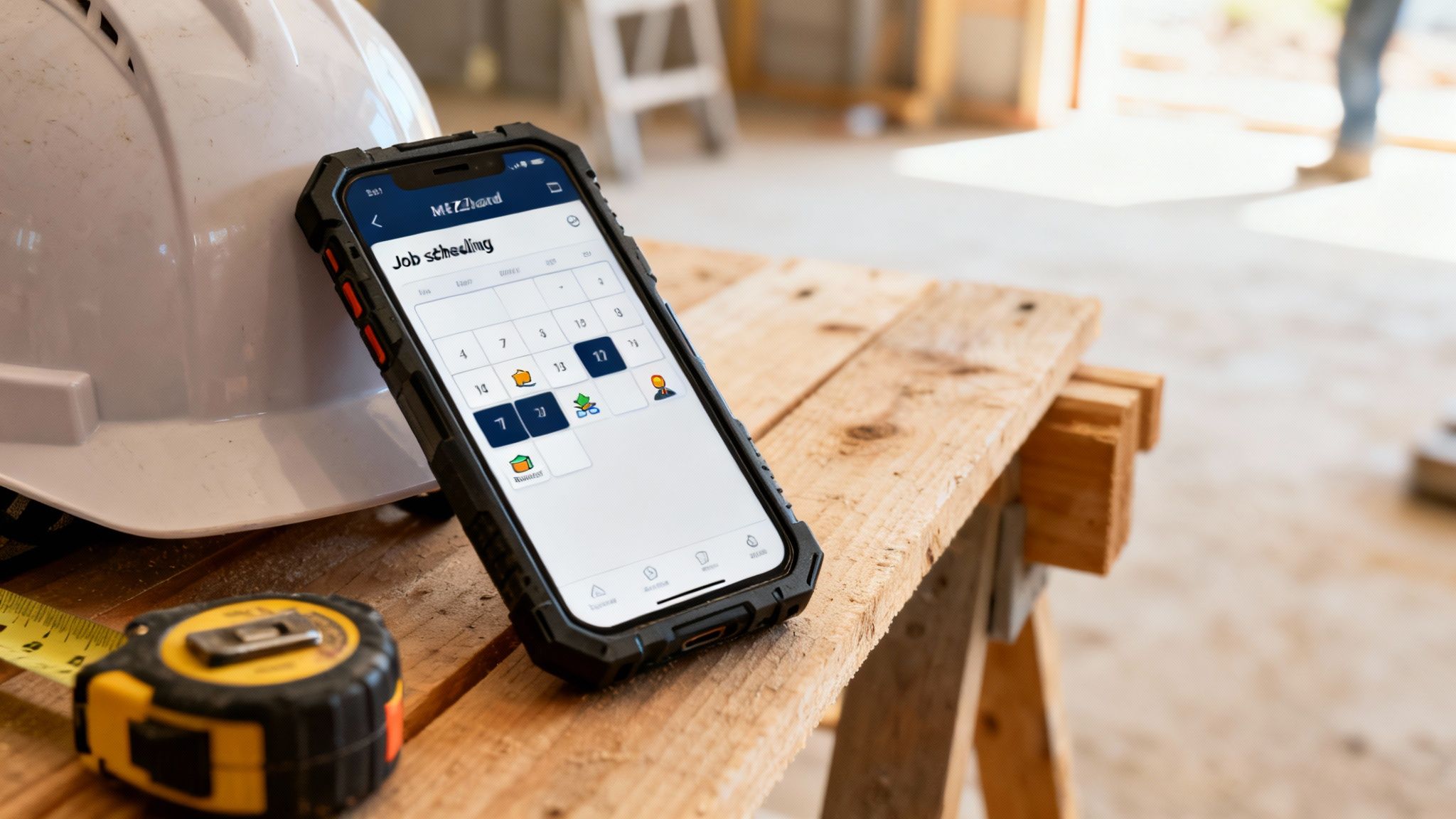
Trying to schedule a job in New Zealand often feels like a constant battle with the unexpected. You aren't just managing your own team; you’re juggling multiple subcontractors across different sites, all while dealing with weather that can shut a project down with little warning. A basic calendar app just doesn't cut it.
You need a dynamic scheduling tool that gives you:
- Drag-and-Drop Gantt Charts: A clear, visual way to map out project timelines and dependencies. You can instantly see how a delay in one trade will affect the entire job.
- Subcontractor Communication: The ability to assign tasks directly to your subbies, who can then confirm their availability and get instant updates if the schedule shifts.
- Weather Integration: Some of the smarter platforms can even overlay weather forecasts onto your schedule, helping you plan around a southerly blast or a week of summer rain.
This level of organisation means that when a Gib delivery is late or a nasty front rolls in, you can adjust the entire schedule in minutes and automatically notify everyone involved. That’s how you minimise expensive downtime.
Resource Management When Skills Are Scarce
It’s no secret there’s a shortage of skilled labour across New Zealand, which makes getting the most out of your crew and equipment absolutely critical. Good resource management features give you a bird's-eye view of who is where and what they’re working on. This stops double-bookings and makes sure your best people are always on the most important tasks.
A study by McGraw Hill Construction found that project managers using dedicated software saved money, mitigated problems, and produced higher quality results primarily through better resource allocation and scheduling.
Look for a system that lets you tag your team members with specific skills (e.g., LBP, certified drainlayer). That way, you can quickly find and assign the right person for a specific task instead of sending an apprentice to do a senior carpenter's job.
Estimating and Quoting with Precision
Quoting a job in New Zealand is a tough gig, especially when the price of timber or steel can jump up in a matter of weeks. To protect your profitability, accurate estimating features are non-negotiable. The right software takes you away from rough guesstimates in a spreadsheet and toward data-driven quotes you can rely on.
Key capabilities should include:
- Supplier Price List Integration: Lets you import and update material costs directly from suppliers like PlaceMakers or Mitre 10.
- Customisable Templates: You can create standard templates for different job types - new builds, renovations, bathroom fit-outs - to speed up the quoting process without starting from scratch every time.
- Labour Cost Calculation: The system should help you accurately factor in charge-out rates, overheads, and your desired profit margin to produce professional, profitable quotes.
When you connect your quoting directly to job costing and invoicing, you create a smooth financial workflow from start to finish. This also makes tracking expenses a breeze, which can be simplified even further when you start using AI for receipt scanning to process hundreds of invoices monthly.
On-Site Data Capture for Remote Work
From the rolling hills of the Waikato to the rugged West Coast, many NZ construction sites have patchy mobile reception at best. This makes strong on-site data capture with offline functionality an absolute must-have. Your team on the ground needs to be able to access plans, fill out daily logs, complete safety forms, and upload photos, even when they have no internet.
The software should simply sync all the data they've captured offline as soon as their device finds a connection again. This gives the office a real-time view of progress, safety compliance, and any issues that pop up, without forcing your crew to drive back to town just to send an update.
Comparing Top Construction Management Software in New Zealand
Choosing the right project management platform is one of the most critical decisions any Kiwi builder will make. The market is flooded with options, from global giants to home-grown contenders, all promising to solve your biggest headaches. But here’s the thing: the best construction project management software in NZ isn’t the one with the most bells and whistles. It’s the one with the right ones that actually fit how you do business.
A residential builder in Auckland has completely different needs to a commercial contractor in Queenstown or a specialised subbie working nationwide. That's why a straight feature-for-feature comparison can be so misleading. We need to look at these platforms through the lens of a New Zealand business owner, focusing on what works for your situation, how easy it is for the team on the tools, and whether it can grow with you.
The Big Players vs. Local Alternatives
In New Zealand, the software landscape is mostly a mix of established international platforms like Procore and Buildertrend, alongside strong local and Australian-developed options that often just feel more tailored to Kiwi workflows. Each has its own philosophy.
Global Platforms (e.g., Procore): These are the heavyweights, often built for massive commercial projects. They offer an incredible depth of features covering every possible angle of construction management, but that complexity usually comes with a steeper learning curve and a premium price tag.
All-in-One Residential Platforms (e.g., Buildertrend): Hugely popular with residential builders for a reason. They aim to be the single source of truth for your business, bundling project management, client communication, and financial tools into one neat package.
Local & Niche Software: We're seeing more and more solutions developed right here or fine-tuned for the NZ/AU market. They often shine in specific areas like quoting, job management for tradies, or seamless integration with local suppliers and accounting systems.
As you start your search, you'll inevitably find yourself evaluating the build vs. buy options. It’s a crucial step to figure out if an off-the-shelf product is the right path or if a more custom solution better suits your unique business needs.
Comparing by Business Type and Needs
Instead of a generic list of pros and cons, it's far more useful to think about which platform is the best fit for different kinds of Kiwi construction businesses. The right choice is all about context.
The most effective software isn't the one with the longest feature list. It's the one your team will actually use every day. If your site foreman finds it too complicated, it doesn't matter how powerful the back-end reporting is.
To make this clearer, here’s a look at how some of the top platforms stack up for different Kiwi business profiles.
NZ Construction Software Feature Comparison
This table breaks down how leading platforms cater to different needs within the New Zealand market, highlighting their strengths in areas like on-site usability and accounting integration.
| Feature | Platform A | Platform B | Platform C | Best For (NZ Context) |
|---|---|---|---|---|
| Primary Use Case | Large-scale commercial projects, multi-stage developments. | Volume home building, custom residential builds, major renovations. | Small to medium trade businesses, subcontractors, smaller builders. | |
| Mobile Capability | Comprehensive but can be complex. Best for detailed reporting. | Excellent. Simple, task-focused app for daily logs, photos, and client updates. | Streamlined and fast. Built for quick timesheets, photos, and job notes. | Platform B and C lead for pure on-site simplicity. |
| Accounting Integration | Advanced ERP connectors, but can be complex to set up. | Strong, deep integrations with Xero and MYOB. | Best-in-class, seamless connection to Xero and MYOB. | Platform C often provides the most straightforward Kiwi accounting link. |
| Subcontractor Management | Robust, with dedicated portals for compliance and payments. | Good. Manages schedules and communication well. | Basic but effective for scheduling and tracking job progress. | Platform A is unmatched for managing complex subbie relationships. |
| Best For (NZ Context) | Main contractors on projects over $5 million with strict compliance needs. | Residential building companies focused on client experience and process. | Electricians, plumbers, and small builders needing massive efficiency gains. |
As you can see, there’s no single "best" platform - only the best fit for a specific situation.
For the Residential Home Builder
If you're a residential builder juggling multiple new builds or renovations, your world revolves around clear client communication, managing your subbies, and keeping a death grip on your margins. Your ideal software has to nail this.
Platforms like Buildertrend are often a go-to for this reason. Their entire workflow is built around the residential journey. The client portal is a game-changer, letting homeowners track progress with photos, approve variations online, and make selections. This one feature can slash the number of calls and emails you field every day, freeing up your project manager to focus on the build.
The trade-off? Because it tries to do everything, it can feel a bit bloated if you only need the basics. Some Kiwi builders find that while it's an all-in-one solution, certain modules aren't as powerful as a standalone, specialist tool.
For the Commercial Contractor
In the commercial space, it's a completely different ball game. Projects are longer, the list of stakeholders is huge, and the financial risk is on another level. Here, features like advanced document control, RFI tracking, and detailed financial reporting are non-negotiable.
This is where a platform like Procore really comes into its own. It was engineered from the ground up to handle the immense complexity of commercial construction. It creates a bulletproof, auditable trail for every drawing revision, communication, and financial transaction - which is absolutely vital for managing disputes and ensuring compliance. Its ability to connect the site to the office in real-time is second to none.
The catch? For a smaller company, Procore can be overkill. The implementation is a serious project in itself, and the pricing is structured for larger businesses managing higher-value project portfolios.
For the Specialist Subcontractor
If you’re a plumber, sparky, or Gib stopper, your needs are different again. You’re not managing the whole project, but you have to manage your own team, schedule jobs without wasting time, and get invoices out the door fast. Your business lives and dies on operational speed and accuracy.
For this part of the industry, simpler, more focused construction project management software in NZ is usually the way to go. Local solutions often excel here, offering slick quoting, easy timesheet management, and flawless integration with Xero or MYOB. Their mobile apps are designed for speed, letting your team on-site capture what they need with just a few taps.
The biggest plus is the simplicity and value for money. These platforms do a few things exceptionally well, without overwhelming you with features you’ll never touch. The potential downside is you might need to bolt on other tools as your business grows more complex.
Getting Your Software to Work with NZ Compliance and Other Tools
Picking the right construction project management software in NZ is about more than just slick scheduling features or fancy quoting tools. For any Kiwi builder, the real test is how well a platform plugs into our unique ecosystem of compliance, accounting, and on-the-ground reality. If it doesn't, you’ll find yourself constantly doing double-entry, manually trying to connect the dots between what's happening on-site and your financial or legal obligations.
The best software doesn't just manage your projects; it becomes the central nervous system for your entire business. It should simplify your compliance headaches and talk effortlessly to the other tools you rely on every day. Get this right, and you'll slash the admin time that bogs you down, freeing you up to focus on what actually matters: building great things.
The Must-Have Integrations for Kiwi Builders
Let’s be honest: for a New Zealand construction company, seamless integration with local accounting software is an absolute deal-breaker. If you're still manually punching invoices, purchase orders, or payroll details from your job management system into Xero or MYOB, you're bleeding time and asking for trouble. Any platform that doesn't play nicely with these is, frankly, not built for the Kiwi market.
A proper integration means that when you tick off an invoice in your project software, it instantly appears in your accounting system, coded and ready to go. This creates a live, accurate link between your site progress and your company's bank balance, giving you a true picture of job profitability without the grunt work.
A seamless flow of data between your project management and accounting software can reduce financial administration time by up to 50%. It transforms two separate, time-consuming tasks into a single, automated workflow.
The decision tree below can help you visualise which software features to prioritise based on your specific business, guiding you toward a solution that actually fits how you work.
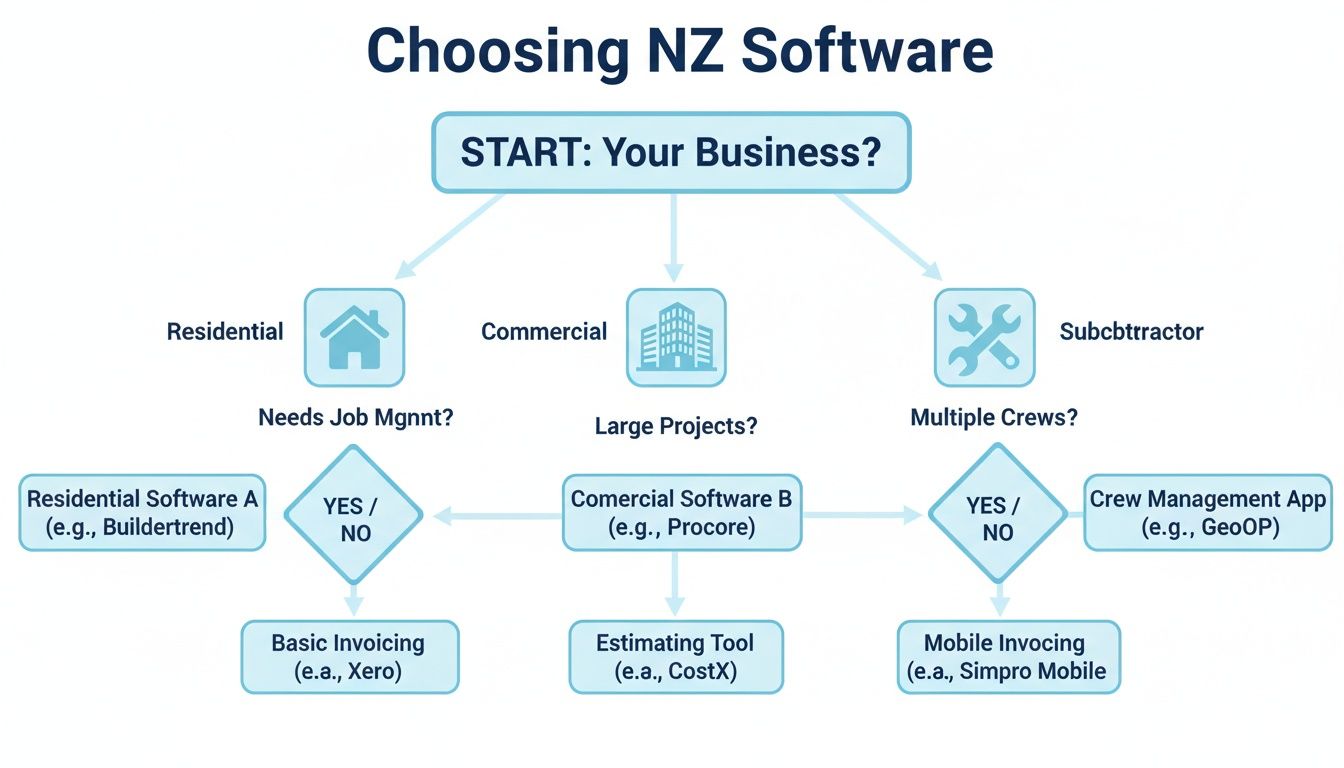
As the flowchart shows, whether you’re a residential builder, a commercial outfit, or a specialised subbie, the right software choice really depends on where your main focus lies.
Ticking the Boxes on Local Regulations
New Zealand’s construction industry is wrapped in some pretty tight regulations, and your project management software should be your best mate in meeting them. From health and safety to building codes, the right platform gives you a clear digital paper trail for everything.
Health and Safety at Work Act (HSWA): Modern platforms let you run toolbox talks, manage site inductions, and log incident reports straight from your phone or tablet. This keeps all your safety records in one spot, making it easy to prove you’re doing the right thing. When looking at the specifics, many Kiwi builders look for WHS Software New Zealand that’s already set up for our local rules.
Licensed Building Practitioners (LBPs): Good software helps you keep track of your team's LBP details, log their supervision hours, and store essential Records of Work. It’s a simple way to maintain professional accountability.
Council Inspections and Consenting: You can use the software to book inspections, store all council-related documents, and keep an eye on consent statuses. This stops crucial paperwork from vanishing into the black hole of an overflowing inbox.
This digital-first approach is quickly becoming the norm. Our construction industry, which makes up 6.5% of GDP, is turning to technology to handle today’s challenges. One industry report found 52% of NZ construction leaders pointed to supply chain chaos as their biggest headache, but those using integrated software cut their procurement mistakes by 40%.
Making Your Digital Workflow Actually Flow
At the end of the day, the goal is to create one connected system where information moves smoothly from one part of your business to the next without you having to lift a finger. This digital glue is where you’ll find the biggest wins in efficiency.
Think about it: a subbie uploads their Record of Work and an invoice through a portal. That simple action can automatically ping your project manager to approve it, and once they do, the invoice shoots straight over to Xero. That’s the power of a truly connected system.
This kind of automation doesn't just save you a heap of time; it also massively cuts down the risk of someone making a mistake. It ensures compliance checks are never skipped and your financial books are always spot on, giving you a solid base to grow your business. For those wanting to push this even further, you can see how AI can cut compliance reporting time from hours to minutes in our deep-dive guide.
How AI Automation Can Enhance Your Project Management
Picking the right construction project management software in NZ is a huge win, but it’s not the final piece of the puzzle. The next real advantage comes from adding a layer of intelligence over these platforms to take care of the manual, repetitive tasks that still eat up your team's day. This is exactly where AI automation steps in.
It’s important to see AI for what it is - not a replacement for your core management system, but more like a super-efficient employee. It works 24/7 handling the grunt work, which lets your software and, more importantly, your people, operate on another level. The goal here is simple: free up your project managers and key staff to focus on what they do best - building client relationships, ensuring quality on-site, and making the big strategic calls.

From Manual Entry to Automated Workflows
Think about this everyday scenario: a subcontractor emails you their monthly invoice. The old way involves someone in your office opening the email, downloading the PDF, logging into Xero, creating a new bill, and painstakingly typing in every single line item. It’s slow, mind-numbing, and a perfect recipe for human error.
An AI workflow completely flips this on its head.
- Step 1: The AI keeps an eye on your inbox, watching for invoices from your known subbies.
- Step 2: When one lands, it instantly reads the document and pulls out all the key data - invoice number, date, amount, and line items.
- Step 3: The AI then pushes this information straight into your Xero or MYOB account, creating a draft bill that’s ready for a quick approval.
This one automation alone can save countless admin hours every month. It cuts down the risk of data entry mistakes and helps ensure your suppliers get paid on time, keeping everyone happy. It's a perfect, practical example of how AI works with the software you already use.
Supercharging Client Communication and Lead Management
Your project manager’s time is their most valuable asset, yet so much of it can disappear answering basic client questions or chasing down new leads. AI-powered voice agents and workflows can take over these front-line communications, acting as a smart digital receptionist for your business.
Picture this: a potential client calls your business after hours to ask about a new build.
- An AI voice agent answers the call straight away. It asks a few qualifying questions (like, "Are you looking to build a new home or do a renovation?") and gathers their contact details.
- If the lead sounds promising, the agent can check your project manager's calendar in real-time and book an initial site visit on the spot.
- The full conversation transcript and contact info are then neatly logged in your CRM or project management tool for your team to pick up in the morning.
This approach means you never miss a lead and always provide a professional first impression, day or night. It frees your team from being chained to the phone so they can focus on managing active projects instead of chasing new ones.
This level of operational improvement is becoming a necessity, not a luxury. With labour productivity in New Zealand's construction sector showing slow growth, industry reports show that most firms are turning to management software for an efficiency boost. Given the major worker shortage, tools offering real-time analytics and automation are enabling teams to hit project milestones faster. You can find more details on these trends by exploring the latest infrastructure market analysis.
The Clear Return on Investment
Bringing in AI automation isn't just about making life easier; it delivers a clear, measurable return on your investment. By automating manual processes, you're directly swapping administrative hours for productive, high-value work. Every hour your PM isn't wrestling with data entry is an hour they can spend on-site preventing a costly mistake or cementing a relationship with a key client.
These small efficiency gains stack up incredibly quickly across your whole operation. To get a better feel for the real-world benefits, check out our in-depth article on how AI workflows can save NZ businesses 20 hours weekly. At the end of the day, adding AI is the logical next step for any Kiwi builder looking to build a more resilient, profitable, and scalable business.
Got Questions About Construction Software? We've Got Answers
Stepping into the world of construction project management software can feel like a big move, especially when you're used to doing things a certain way. If you're wondering about the real-world costs, the time it takes to get started, and how it all fits with the Kiwi way of building, you're not alone. We've pulled together the most common questions we hear from builders around New Zealand to give you straight-up, practical answers.
Let's cut through the sales talk and get right to what you need to know.
How Long Does It Really Take to Get Set Up?
This is probably the biggest question on everyone's mind, and the answer is usually much shorter than you'd expect. For most small to mid-sized building companies here in NZ, you're looking at a 2-6 week window from signing up to being fully operational. That timeframe covers the initial setup, moving over essential data like your client list or price books, and getting the team comfortable with the new tools.
The best platforms don't just hand you the keys and walk away; they provide dedicated support to get you going. This means you'll have someone helping you mould the software to your specific workflows, which makes a huge difference in getting your crew on board from day one.
The secret to a smooth rollout? Don't try to boil the ocean. Nail one or two core features first - like daily logs or scheduling - before you introduce everything else.
This approach stops people from feeling overwhelmed and lets your team see the immediate wins, making them much more likely to actually use the new system.
Is This Stuff Actually Affordable for a Small Building Company?
Yes, it absolutely is. The old idea that this kind of tech is only for the big commercial players is well and truly outdated. Most modern software is sold as a subscription, with pricing tiers specifically built for smaller teams.
For a small crew, you can expect entry-level plans to start from around $150-$400 NZD per month. It's a genuine business cost, for sure, but you have to weigh it against the return. The software often pays for itself within a couple of projects, thanks to savings in a few key areas:
- Less Admin Drudgery: Think of all the hours you'll get back from not having to manually quote, invoice, or chase up information.
- Fewer Costly Mistakes: When everyone's working off the latest plans, you minimise the kind of rework that kills your profit margin.
- Real-time Job Costing: Finally, you can see exactly where your money is going on a project, allowing you to protect your margins before it's too late.
When you add it all up, that monthly fee starts to look less like an expense and more like a smart investment in a more profitable business.
Can This Software Help with NZ Health and Safety Compliance?
Without a doubt. In fact, this is one of the biggest reasons Kiwi builders make the switch. Many of these platforms are designed to help you nail your obligations under the Health and Safety at Work Act (HSWA), giving you a digital framework and a rock-solid audit trail.
You can use the software to handle critical safety tasks right from your phone or tablet:
- Run and record digital toolbox talks and pre-start meetings.
- Manage site inductions for every person who steps foot on your site.
- Log hazards and incidents instantly, with photos, right from where they happen.
- Keep all your key safety documents, like Safe Work Method Statements (SWMS), in one central spot where everyone can find them.
It means all the latest safety info is always at hand, and if a WorkSafe inspector shows up, you can prove your compliance in minutes.
Do My Subbies Have to Pay to Use It?
That's a very fair question, and the answer is almost always no. Most construction management platforms provide free, limited-access accounts for your subcontractors and other partners. This is a game-changer for keeping everyone on the same page.
Your chippies, plumbers, and sparkies can log in on their phones to check the latest schedule, pull up the plans, see what they need to do, and message your site manager directly. They get all the info they need to do their job right the first time, and you remove a massive hurdle by not asking them to fork out any cash.
Ready to stop wasting time on manual admin and start running a more efficient, profitable construction business? Automate AI designs and builds custom AI workflows that connect with your existing tools to automate quoting, invoicing, lead follow-ups, and more. See how we can give you back hours every week by visiting Automate AI New Zealand.
Found This Helpful?
Book a free 30-minute discovery call to discuss how we can implement these solutions for your business. No sales pitch, just practical automation ideas tailored to your needs.
Automate AI Team
AI Automation Expert at AutomateAI