AI Document Processing NZ: The Guide to Smarter Business Automation
For so many Kiwi businesses, the daily grind of paperwork feels endless. Invoices, receipts, client forms - it all piles up, demanding time and attention. AI document processing in NZ is the simple, practical answer. Think of it as a digital assistant that reads, understands, and files your important documents around the clock, with no mistakes, and plugs right into the tools you already use, like Xero and MYOB. This isn't about fancy tech for its own sake; it's about freeing you up to actually run and grow your business, not just manage its admin.
Ending Paperwork Overload for Kiwi Businesses
Does your team spend more time keying in data than doing the work that actually brings in money? It’s a familiar story for many small and medium-sized businesses across New Zealand. The constant stream of documents, from supplier invoices to new client onboarding forms, creates a massive administrative headache that slows everything down and gets in the way of growth.
This isn't just a minor hassle - it's a serious operational bottleneck. Every hour someone spends manually typing details from a PDF into your accounting software is an hour they’re not spending on sales, talking to customers, or planning ahead. And let's not forget the ever-present risk of human error, which can lead to costly payment mistakes, compliance headaches, and hours wasted trying to find a single typo. For busy Kiwi business owners, it’s a constant drag on the bottom line. We dive deeper into this issue in our guide on the hidden costs of manual data entry.
The Shift to Smarter Workflows
Now, imagine a better way. Instead of printing, scanning, and typing, a smart system does all the heavy lifting for you. By embracing automatic document processing, businesses can slash their paperwork and build workflows that just work. This technology is the bridge between your documents - whether they're paper or digital - and your core business software.
This shift lets your team focus on what they do best. They stop being data entry clerks and start being reviewers and strategists, using perfectly organised information to make smarter decisions. It’s all about getting back precious time and putting it towards work that actually generates revenue.
To see just how big the difference is, let's compare the old way with the new way.
Manual vs AI Document Processing: A Quick Comparison
This table shows the clear operational differences between traditional manual document handling and modern AI-powered processing for key business tasks in New Zealand.
| Business Task | Manual Processing (The Old Way) | AI Document Processing (The New Way) |
|---|---|---|
| Invoice Processing | An employee manually reads each invoice, types data into Xero/MYOB, and saves the file. Takes 5-10 minutes per invoice. Prone to typos. | AI extracts all data in seconds, automatically creates a draft bill in Xero/MYOB, and attaches the original document. An employee just needs to approve it. |
| Receipt Management | Staff collect paper receipts, scan them, and manually enter amounts, dates, and vendors for expense claims. Often leads to lost receipts. | Simply snap a photo of the receipt. The AI reads it, categorises the expense, and pre-fills the claim. No more shoeboxes full of paper. |
| New Client Onboarding | A client fills out a paper or PDF form. Admin staff then re-type all that information into the CRM and other systems. | The client fills out a digital form (or you scan their paper one). The AI instantly pulls the data and creates a new client profile in your CRM automatically. |
The contrast is stark. One path is slow, expensive, and risky, while the other is fast, accurate, and lets your team do more valuable work.
AI document processing isn’t about replacing people. It’s about freeing them from repetitive, soul-crushing tasks so they can contribute in more meaningful ways. It turns administrative dead-time into productive growth time.
The best part? This technology is no longer just for the big players. It’s now accessible and affordable for SMEs all over New Zealand, offering a clear path to working smarter and getting rid of operational stress for good.
How AI Actually Reads and Understands Your Documents
It’s tempting to think of AI document processing as some kind of digital magic, but what's going on under the bonnet is actually quite logical. Think of it less like a magic trick and more like a clever two-step system that copies how a person would read and interpret a document.
Let's trace the path of a typical supplier invoice, from the moment it lands in your inbox to when it shows up in your accounting software.
The second a document like a PDF invoice arrives, the first part of the AI gets to work. This is its 'eyes', a technology called Optical Character Recognition (OCR). OCR essentially scans the document - whether it’s a perfect digital file or a slightly blurry photo of a paper receipt - and turns all the images of letters and numbers into text a computer can read. It’s the digital version of simply reading the words on a page.
From Reading Words to Grasping Meaning
Of course, just reading the words isn’t the same as understanding what they mean. That’s where the AI’s ‘brain’ comes in: Natural Language Processing (NLP).
NLP takes the raw text from the OCR step and starts figuring out the context. It’s what allows the AI to see "15/07/2025" and know that’s the due date, not the invoice date, or to correctly identify "123-456-789" as a GST number.
This whole process turns a jumble of unstructured data into perfectly organised, useful information. The AI is smart enough to find and label all the key details, such as:
- The supplier's name and contact info
- The total amount due, including the GST component
- Individual line items, descriptions, and quantities
- The unique invoice number and issue date
To really get your head around how AI turns messy paperwork into clean data, it’s worth understanding the concept of Intelligent Document Processing (IDP). This is the engine driving the whole operation, making it possible to automate everything without someone having to check it all by hand.
The flow is actually quite simple when you see it mapped out.
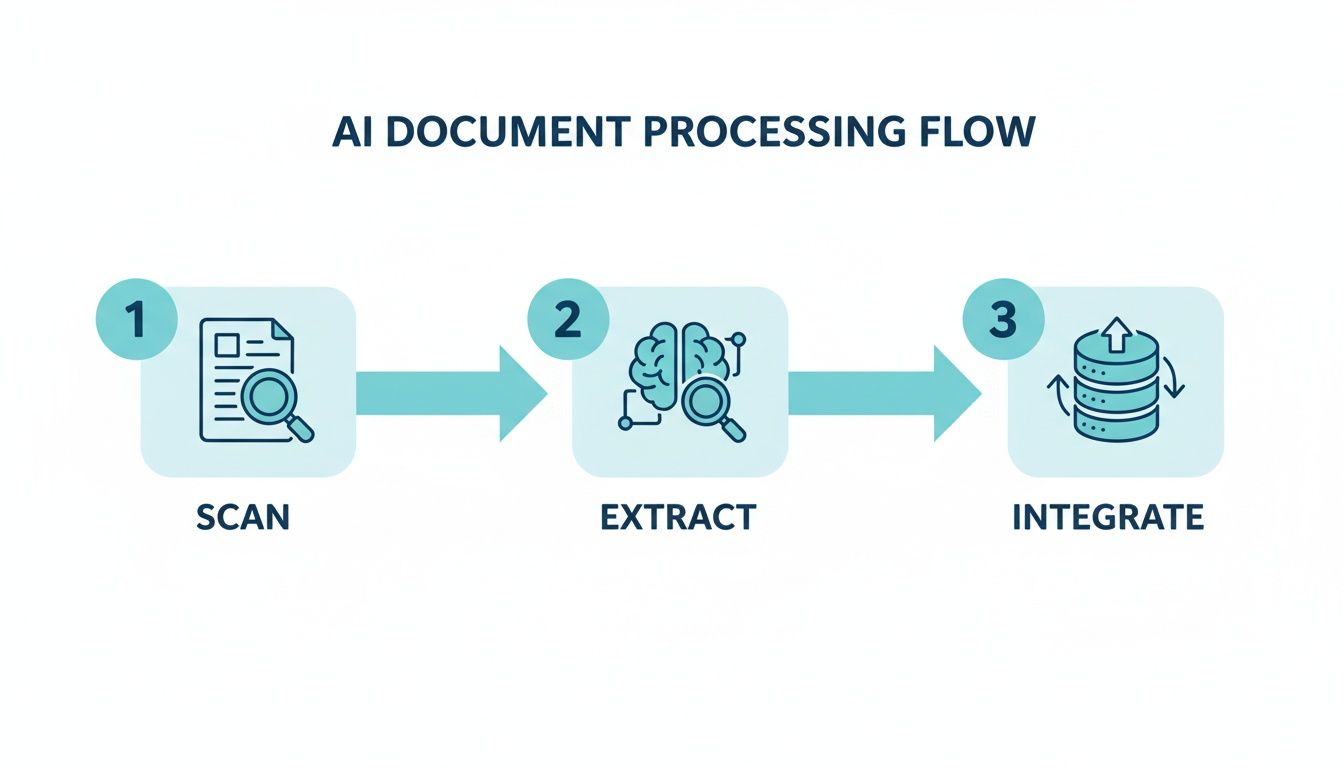
This diagram shows how a raw document is scanned, the important information is pulled out, and then it's sent straight into your other business systems.
For Kiwi businesses, the real power here is turning unstructured chaos into structured clarity, instantly. It takes the single most tedious part of admin - manual data entry - and gets rid of it completely.
Ultimately, the data doesn't just get extracted; it gets put to work. The details from an invoice can automatically create a draft bill in Xero, or the information from a new client form can update a record in your CRM. It all happens seamlessly in the background, giving your team a huge productivity boost without them needing to be tech experts.
Real-World AI in Action for New Zealand Businesses
It’s one thing to talk about technology, but it’s another to see it making a real difference. For small and medium businesses across New Zealand, AI document processing isn't some far-off idea - it's a practical tool that's solving daily headaches right now.
Let's ground this in reality. Picture a busy real estate agency in Auckland. They're juggling tenancy agreements, property reports, and a constant stream of maintenance invoices. Instead of someone spending hours manually typing everything into the system, an AI can read each document instantly. It pulls out tenant names, bond amounts, and invoice due dates, then files everything in the right place, automatically. Your property managers are now free to focus on what they do best: looking after clients and properties.
Solutions That Fit How Kiwis Do Business
Every industry has its own unique flavour of paperwork. The good news is that AI document processing can be shaped to tackle the specific challenges Kiwi companies face every day.
Construction and Trades: Think of a building firm in Christchurch. They get hammered with supplier invoices and subcontractor claims. AI can process these on the fly, matching them against purchase orders, checking the GST is correct, and flagging any odd-looking figures before they cause a problem. It’s a simple way to speed up payments and keep suppliers happy.
Healthcare and Medical Clinics: A GP practice in Wellington can make patient intake a breeze. When a new patient hands over their registration forms, the AI reads it all - NHI number, ACC claim details, you name it - and puts it straight into the patient management system. No typos, no delays. This gets patients seen faster and frees up the front desk to focus on care.
Legal Practices: Law firms are famous for their mountains of paper. An AI system can scan and index thousands of case files, contracts, and discovery documents, making every piece of information searchable in seconds. This saves lawyers and paralegals a massive amount of time, letting them get on with building their cases.
At its heart, the benefit is simple: AI handles the repetitive, high-volume document work that burns out your team. It turns frustrating admin bottlenecks into smooth, automated processes that just work.
More Than Just Invoices
The power of this technology is that it isn’t a one-trick pony. A single AI document processing NZ solution can be set up to manage a whole range of different workflows inside your business.
Take a small tourism operator in Queenstown, for example. They could use their AI to:
- Handle Bookings: Automatically pull all the key details out of booking confirmation emails from travel agents.
- Pay Suppliers: Process invoices from local transport companies, hotels, and activity providers without manual entry.
- Onboard New Staff: Grab all the info from employment contracts and IRD forms when taking on new seasonal guides.
Each of these examples shows a classic Kiwi business problem being solved with smart automation. This isn't about replacing people; it's about giving them better tools. By handing the boring stuff over to a reliable digital assistant, New Zealand SMEs can get thousands of hours back each year, slash errors, and build a stronger, more efficient business that’s ready to grow.
Connecting AI with Your Existing Business Systems
One of the biggest worries for any Kiwi business owner is bringing in a new tool, only to find it doesn't play nicely with your current setup. The good news is that modern AI document processing solutions are built to slot right into the software you already rely on every day.
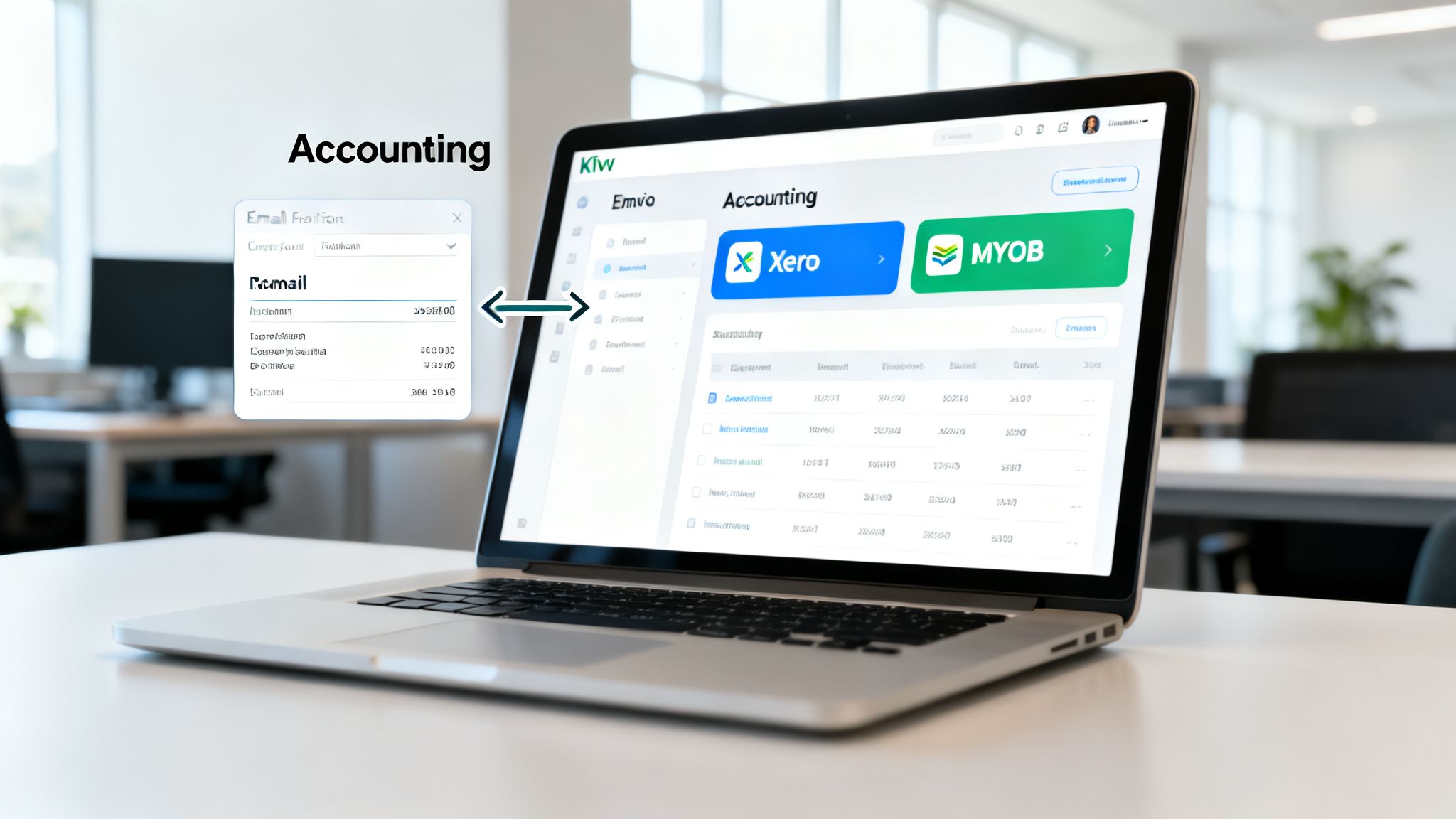
You don’t have to tear everything down and start from scratch. Instead, think of this technology as a smart connector, linking your documents directly to critical platforms like Xero, MYOB, or your CRM. It builds a seamless network that breaks down information silos and, most importantly, stops your staff from having to manually punch the same data into multiple systems.
Mapping a Typical Automated Workflow
To really get a feel for how this works, let’s walk through a common scenario: a supplier invoice landing in your inbox. The whole process is designed to be completely hands-off.
- Invoice Arrival: A supplier emails an invoice (as a PDF attachment) to your designated accounts email address.
- AI Data Extraction: The AI system is constantly watching. It immediately sees the new email, opens the PDF, and reads all the important details - supplier name, GST number, due date, line items, the lot.
- Accounting Software Integration: With the data now neatly structured, the AI pushes it directly into your accounting software. A new draft bill is automatically created in Xero or MYOB, with the original invoice file conveniently attached for your records.
- Team Notification: To close the loop, a notification zips over to your accounts person via a tool like Slack or Microsoft Teams, letting them know a new bill is ready for their final review and approval.
This entire sequence unfolds in just a few minutes, without anyone having to do a single bit of data entry. Your employee's job shifts from mind-numbing typing to a quick, final check. This is the kind of efficiency that makes a real difference.
It's no surprise that 51% of New Zealand businesses now see AI as their number one technology opportunity for 2026, with a huge focus on weaving it into their core workflows. As highlighted in recent NZ business innovation reports, there's a growing realisation that connecting systems is where the real productivity gains are found.
You Don’t Need to Be a Tech Expert
Here’s the best part: you don't need any technical skills to get this up and running. A good AI document processing NZ partner will handle the entire integration for you.
They’ll sit down with you to map out your current processes, connect the AI to your specific software, and manage the whole setup from start to finish. All you need to do is explain what you want to achieve, and they build the solution.
Even if you’re running on older, more complicated software, there are still clever ways to bridge the gap. For anyone worried about connecting to an established platform, our guide on legacy system integration has some practical advice. The goal is always the same: a smooth, automated system that frees up your team to focus on what really matters, knowing the data flowing between your tools is fast, accurate, and reliable.
Navigating Data Privacy and Security in New Zealand
Bringing powerful automation into your business means you have to get serious about data security. For any Kiwi business handling sensitive client details or financial records, using AI to process documents requires a careful, considered approach. The absolute key is making sure your chosen solution is built from the ground up to respect New Zealand's laws.

It all starts with the New Zealand Privacy Act 2020. Any provider you trust with your documents must operate strictly within these rules, which dictate how personal information is collected, stored, and used. This isn't just a compliance checkbox; it's about building genuine trust with your customers and protecting your own business.
Why Onshore Data Handling Matters
A huge piece of the puzzle is data sovereignty. At its core, this is the simple idea that your data is subject to the laws of the country where it’s physically stored. When you work with a local Kiwi provider using onshore data centres, you're guaranteeing your information stays under New Zealand's legal protection.
Choosing an AI partner that keeps your data right here in Aotearoa has some pretty clear benefits:
- Legal Protection: Your data is squarely governed by the NZ Privacy Act. This gives you clear legal protections and a straightforward path if something goes wrong.
- Reduced Risk: You sidestep the murky waters and potential risks that come with having sensitive commercial information processed in overseas data centres.
- Peace of Mind: You know exactly where your data lives and that it's being managed by a team that gets your obligations as a local business.
For any NZ business, the question shouldn't be if your AI provider is secure, but how they prove it. This means demanding bank-level encryption for all data - both when it's moving and when it's sitting on a server - and confirming that their servers are located right here in New Zealand.
By making local, secure data handling a top priority, you really do get the best of both worlds. You can tap into the incredible efficiency of AI document processing while fulfilling your duty to protect your clients' information and your own.
If you want to dig a bit deeper, you can learn more about why data sovereignty is crucial for NZ businesses. Honestly, it's a non-negotiable for doing this right.
Your Roadmap to AI Document Processing
So, you're ready to get started? Good. Bringing AI automation into your business isn’t some massive, complicated IT nightmare. With the right local partner, it's a straightforward journey, and we follow a clear, effective roadmap to get you there.
The whole thing is designed to be quick. Most of our custom solutions are up and running in a matter of weeks, not months. The goal is simple: get you a return on your investment, fast. This isn't like those drawn-out tech projects from years ago; modern AI document processing NZ solutions are built for speed and immediate impact.
Discovery: The First Step
It all begins with Discovery. This is where we sit down with you and really get under the bonnet of your current processes. We'll map out how documents flow through your business right now, pinpointing the exact bottlenecks and figuring out where we can get the biggest, quickest automation wins.
Think of it as a collaborative workshop. We're focused on solving your specific headaches, whether that's the soul-destroying task of manual invoice entry or the delays in getting new clients onboarded.
Build and Launch
Next up is the Build phase. This is where our tech team does all the heavy lifting. They'll configure the AI engine, set up the secure integrations with your existing software like Xero or MYOB, and run a battery of tests to make sure everything is humming along perfectly.
Finally, it's time for Launch. Your new automated workflow goes live, and your team starts getting time back in their day, right away. The best part? It's not a "set and forget" situation. We provide ongoing support and monitoring to ensure it keeps running smoothly long after go-live.
A key part of the planning process is calculating your return on investment. By estimating the hours saved on manual labour and adding the value gained from faster processing times and fewer errors, you can build a clear business case for automation.
This approach is already making a difference for organisations across New Zealand. Take Fire and Emergency New Zealand (FENZ), for instance. They successfully automated their invoice management across 650+ stations, which slashed their processing delays. As you can learn more about AI efficiency in NZ's public sector, it’s a powerful example of how effective a well-planned project can be.
Common Questions from Kiwi Business Owners
It's natural to have a few questions before jumping into a new way of working. Let's tackle some of the most common queries we hear from Kiwi business owners when they're thinking about AI for their documents.
How Much Does It Cost for a Small Business?
It’s probably more affordable than you imagine. For a small business, you can often get started with a single, focused automation - like getting invoices into Xero - for around $99 per month.
When you think about the hours of manual admin you save each week, the return on investment kicks in almost immediately. From there, you can scale things up as your business grows and your needs change.
Is My Business Data Secure?
This is a big one, and the answer is a firm yes. Any reputable provider, especially a local one, will treat your data security with the seriousness it deserves.
We're talking about bank-level encryption and strict adherence to the New Zealand Privacy Act. Choosing a Kiwi partner adds that extra layer of confidence, knowing your sensitive information is being handled right here at home and stored onshore.
Adopting AI is fast becoming standard practice for Kiwi businesses. New Zealand's AI strategy points to a broad business experimentation phase, with 82-87% of companies expected to be using AI by 2026, making it table stakes for staying competitive. While SMEs sometimes face barriers like skills shortages, the success of public sector projects proves the technology is scalable and ready for businesses of all sizes, as you can learn more in the full MBIE report.
Do I Need to Be a Tech Expert?
Definitely not. The whole point of working with an AI automation partner is to make life easier for you, not to give you another technical headache.
The best partners are set up for busy business owners, not IT specialists. They’ll sit down with you, learn how you currently do things, and then they'll handle all the technical heavy lifting - building the automation, linking it to your existing software, and making sure the launch goes smoothly. All you need to do is explain your process; they'll take it from there.
Ready to stop wasting time on manual data entry and see how AI can transform your operations? Automate AI designs and builds custom automation solutions that get you a return on investment from day one. Book a free discovery call with us today to map out your opportunities.
Found This Helpful?
Book a free 30-minute discovery call to discuss how we can implement these solutions for your business. No sales pitch, just practical automation ideas tailored to your needs.
Automate AI Team
AI Automation Expert at AutomateAI